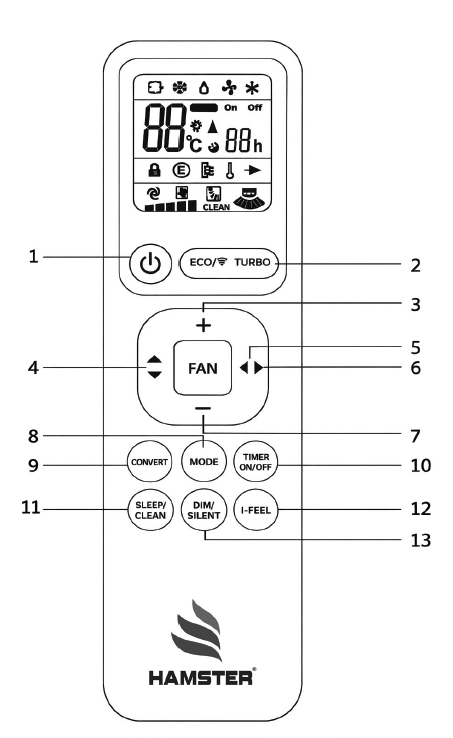
Air-Conditioner Remote
Controller Instructions
- 1Use to ON/OFF (standby) machine.
- 2Use to enter or quit the Energy saving Mode / Use to set fan speed at maximum.
- 3To increase set temperature and timer on/off value.
- 4It is used to operate the U-D flap.
- 5It is used to operate the fan speed.
- 6It is used to operate the L-R flap (Reserved).
- 7To decrease set temperature and timer on/off value.
- 8To select operation mode.
- 9To convert AC into different capacity.
- 10To operate timer ON/OFF function.
- 11Use to set sleep or cancel sleep function / Use to activate or cancel clean function.
- 12The air conditioner replaces the temperature of the internal ambient sensor with the temperature of the remote control sensor.
- 13Use to set ON/OFF Display / Use to activate or cancel silent operation.
- *Carefully read these instructions for safe and correct use of the air-conditioner.
- *Carefully keep the instructions manual as it can be referred to at any time.