Operating Instructions
Operation Without the Remote Control
If you have lost the remote control unit or if it is malfunctioning, follow the steps below.
1. How to turn on the air conditioner:
Open the front panel if necessary, press the ON/OFF button with a ball-point. Then the air conditioner will automatically select the operation mode according to the room temperature.
2. How to turn off the air conditioner:
Open the front panel if necessary, press ON/OFF button with a ball-point.
Note: Do not press the ON/OFF button too long, as it may cause the air conditioner to operate abnormally.
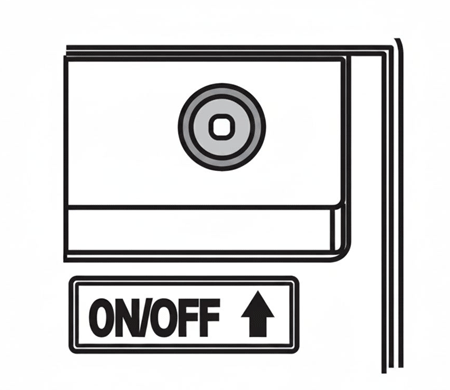
* For reference purpose
Tips for Energy Saving
If the air inlet and air outlet is blocked, it might affect the normal heat exchange of the air conditioner and even cause damage to the appliance. When the air conditioner is operating in Cooling Mode during the daytime, please use a sun shield or curtains to keep direct sunlight from entering into the room. If the walls and ceiling are irradiated by sunlight, it will take a long time to achieve the set temperature during cooling operation. Clean the air-filters at a certain time, about every two weeks, and keep the air-filters clean to ensure normal heat exchange of the indoor unit. Keep the door and windows well closed when the air-conditioner is running to avoid loss of heat.
Functions Available in Different Modes
| Functions Available in Different Modes | ||||
|---|---|---|---|---|
| Cool | Dry | Fan | Auto | |
| Sleep | ✓ | ✕ | ✕ | ✕ |
| Dim | ✓ | ✓ | ✓ | ✓ |
| Clean | ✓ | ✕ | ✕ | ✕ |
| Turbo | ✓ | ✕ | ✕ | ✕ |
| Fan Speed | ✓ | ✕ | ✓ | ✓ |
| Silent | ✓ | ✕ | ✕ | ✕ |
| Timer | ✓ | ✓ | ✓ | ✓ |
| Swing | ✓ | ✓ | ✓ | ✓ |